AI Websites 101 · Free mini course
Your main street needs websites. Learn how to make them.
The detailer, the landscaper, the barber with a Facebook page instead of a site. Learn how to build AI websites in an afternoon, then learn how to offer one to the owners you already know. Free, no code.
No card. No commitment. Unsubscribe with one tap.
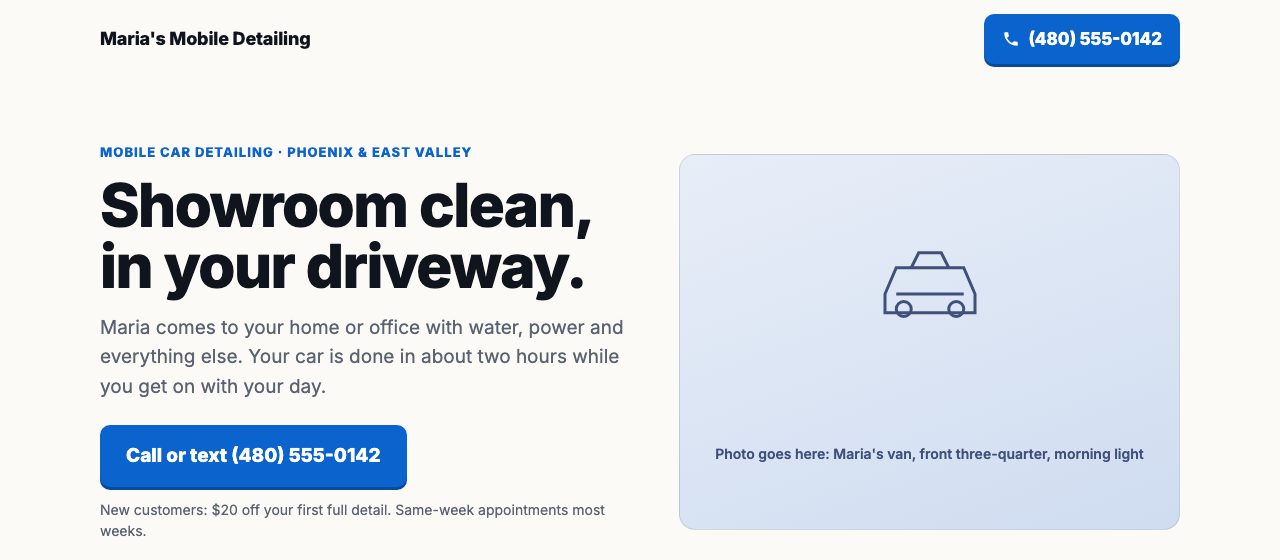
Watch it get built. The prompt from lesson 3, the photos from lesson 4, zero code. A page for a fictional business. Tap to open the real thing.
- Eighteen short lessons, a few minutes each
- No code, no design skills
- Works on your phone
- From the OutletDomains team
Questions? Text (480) 669-1684
Two courses and a bonus, eighteen lessons, no card.Your access code arrives by email in seconds.
Start learning freeThe familiar version
The truck with a phone number. The flyer at the coffee shop. The page they never got around to.
The people who look after their town are the ones who notice what is missing and fix it. A good page for a good business is the most useful thing you can hand someone this month.
Build one for someone you know
Course 2 starts with a list of ten businesses you already drive past.
Show, do not pitch
Build the page first, hand them your phone, say nothing. Then: want it live?
Three honest ways to deliver
One-time, monthly, or hand it to a team that builds and hosts it. Lesson 4 lays them out plainly.
What's inside
Two courses and a bonus. Each lesson is short, specific, and ends with one thing to do.
Course 1 · Build an AI website
Six lessons 3 min read
What you're building, and the three free accounts
Build · Lesson 1
 3 min read
The brief: ten facts about the business
Build · Lesson 2
 3 min read
The prompt: from brief to finished page
Build · Lesson 3
 3 min read
Make it theirs: photos, colors, words
Build · Lesson 4
 3 min read
Put it online in sixty seconds, free
Build · Lesson 5
 3 min read
The ten-point check before anyone sees it
Build · Lesson 6
Course 2 · Offer AI websites as a service
Six lessons 3 min read
Who needs one, and how to spot them in five minutes
Offer · Lesson 1
 3 min read
Build it before you ask: the demo-first method
Offer · Lesson 2
 3 min read
What to say: the forty-second conversation
Offer · Lesson 3
 3 min read
What to charge: three honest options
Offer · Lesson 4
 3 min read
Delivery day: handoff, hosting, and edits
Offer · Lesson 5
 3 min read
Your first ten, and the easy way to keep going
Offer · Lesson 6
Bonus · Services every business needs
Six lessons 3 min read
Mystery lesson 1: revealed inside
Bonus · Lesson 1
 3 min read
Mystery lesson 2: revealed inside
Bonus · Lesson 2
 3 min read
Mystery lesson 3: revealed inside
Bonus · Lesson 3
 3 min read
Mystery lesson 4: revealed inside
Bonus · Lesson 4
 3 min read
Mystery lesson 5: revealed inside
Bonus · Lesson 5
 3 min read
Mystery lesson 6: revealed inside
Bonus · Lesson 6
Made for people who would rather do than watch
No experience is assumed. Every lesson ends with one concrete thing to do, and by lesson 5 a page is live.
A new skill
Someone who wants to build a professional website with AI this week
The build course walks from a blank chat to a live page with a real address, without learning code.
A business owner
Anyone who would rather build their own page in an afternoon than wait weeks for a quote
One page that says what you do, where, why you, and how to reach you. Then make it better over time.
A helper
A freelancer or assistant whose clients keep asking for a website
The offer course covers who needs one, how to show instead of pitch, what to say, and what to charge.
How access works
Three steps, about a minute.
Step 1
Enter your name and email
Your phone number lets us text you when a new lesson or video is added. Your current website, if you have one, is optional.
Step 2
Type the 8-digit code we send
No password to make or remember. The code, or the link in the same email, signs you in.
Step 3
Start lesson 1 on your phone
Progress is saved as you go. Come back any time with a fresh code.
Questions
Is it really free?
Yes. Both courses and the bonus, all eighteen lessons. There is no card to enter and nothing to buy to finish the course.
Do I need to know how to code?
No. The AI writes the page. You describe the business, check the result, and ask for changes in plain words. If you can send a text message, you can do this.
What tools do I need?
A free account with an AI chat that writes code (we use Claude; ChatGPT or Gemini also work), a free Netlify account to put the page online, and a phone or laptop.
Is there anything to buy later?
Nothing is required. Inside the course we mention OutletDomains, the company behind this course, which builds and hosts websites for businesses. Using them is optional, and the course works without them.
How do I log in later?
Enter your email on the login page and we send a fresh code. There is no password.
Who is behind this?
OutletDomains LLC in Arizona, a team that builds and maintains websites for small businesses. Call or text (480) 669-1684.